Important Update to the Lizzy Care App
15 Jun 2026A new version of the Lizzy Care app is rolling out starting June 15 2026 around 12:00 PM ET.
In many cases, your phone will update the app automatically. If it does not, you can also update it manually in the App Store or Google Play Store using the steps below.
This new version keeps all the core features you already rely on, while making the app feel smoother, easier to navigate, and more connected.
What’s New
With this update, you’ll notice:
- A refreshed look and feel across the app
- Faster navigation and improved performance
- The ability to reply directly to updates in your Feed
- Improved Care Plans, Schedules, and Care Team views so important information is easier to find
Our goal is to make dementia care feel more connected, coordinated, and easier to navigate for families like yours.
Good News: Your Phone May Update the App Automatically
Many phones are already set to update apps on their own. If that is the case for you, you may not need to do anything at all.
If you do not see the new version of the Lizzy Care app by later today, you can update it manually by following the instructions below.
How to Update the Lizzy Care App on iPhone
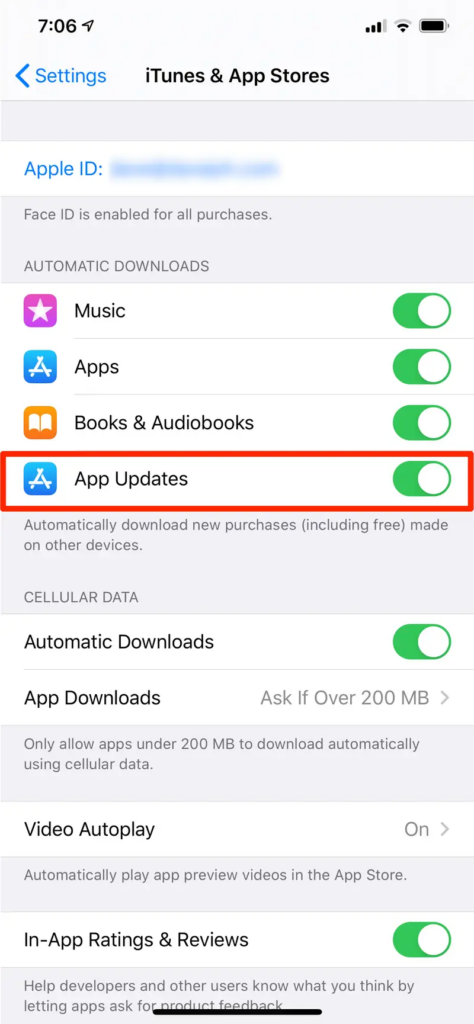
To turn on automatic updates:
- Open the ‘Settings’ app on your device.
- Scroll down and tap ‘App Store’.
- Toggle ‘App Updates’ under Automatic Downloads to ‘On’.
This setting will help your device automatically download updates whenever they are available, ensuring that the Lizzy Care app functions optimally.
To check for an update manually:
- Open the App Store
- Tap your profile icon in the top right corner
- Scroll down to see available updates
- If you see Lizzy Care, tap Update
How to Update the Lizzy Care App on Android
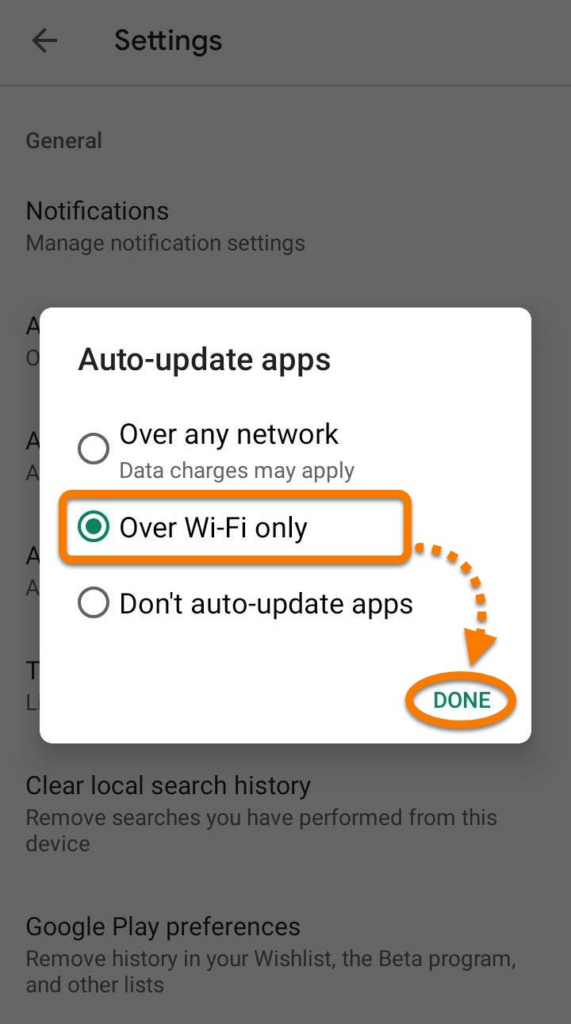
To turn on automatic updates:
- Tap on your profile icon at the top right corner of the screen.
- Select ‘Settings’ from the menu.
- Tap ‘Network Preferences’.
- Under ‘Auto-update apps’, select ‘Over Wi-Fi only’ or ‘Over any network’ based on your preference to avoid potential data charges.
To check for an update manually:
- Open the Google Play Store
- Tap your profile icon in the top right corner
- Tap Manage apps & device
- Tap Updates available
- If you see Lizzy Care, tap Update
If You Don’t See the Update Yet
If the update is not showing up right away, do not worry. Rollouts can take a little time, and it may appear later in the day depending on your device.
You can also try:
- Closing and reopening the App Store or Google Play Store
- Restarting your phone
- Checking again a little later
If You Need Help
If you have trouble updating the app, signing in, or finding a feature after the update, we’re happy to help.
Email: support@lizzycare.com
Phone: 234-567-9449
You do not have to figure it out alone.
Thank You
Thank you for using the Lizzy Care app and for trusting us to support your family.
We’re always working to make the experience easier, clearer, and more helpful for caregivers and loved ones alike.We are excited to announce an important update to the Lizzy Care mobile application, which will be rolling out in the coming days. This update will introduce enhancements that aim to improve your experience and ensure smoother functionality of the services we provide. To continue enjoying all the features of Lizzy Care without interruption, it is crucial that you update your app to the latest version after it is released.