Stay Connected When It Matters Most: Introducing Incident Reporting in Lizzy Care
1 Sep 2026Managing a loved one’s care involves juggling countless details: appointments, medication schedules, daily observations. But what happens when something unexpected occurs? A fall. An urgent ER visit. A medication change. These moments require quick communication with your entire care circle. That’s why we built Incident Reporting into the Lizzy Care app.
The Challenge
When a health event happens at home, time is critical. Family members need to know. Your Navigator needs to know too. But in the rush of the moment, important details can get lost in phone calls, texts, or fragmented messages across different platforms.
We heard from families that they needed a faster, more structured way to report these incidents, something that captures what happened, when it happened, and why it matters, all in one place where everyone who needs to know can see it.
The Solution: Incident Reporting
With Incident Reporting, you can now log important health events directly from the app in just a few taps. When something happens, you no longer need to make multiple calls or send scattered texts. Instead, you create a structured incident report that immediately alerts your Navigator and keeps your entire care circle informed.
Here’s how it works:
Step 1: Start an Incident Report
From the Feed, simply tap “Create post” and select Incidents.
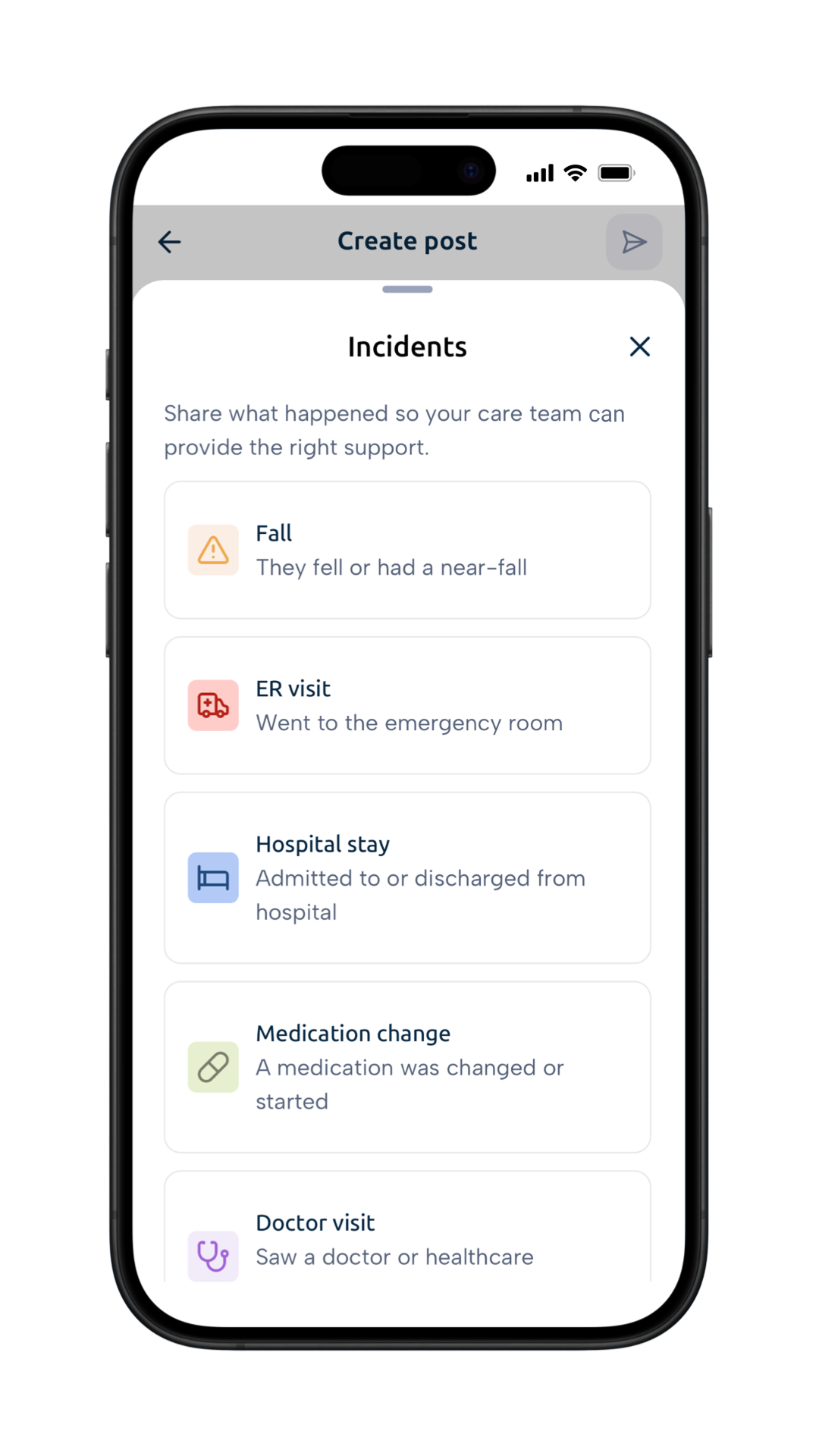
Step 2: Choose the Incident Type
Select from common health events:
Step 3: Fill in the Details
Answer a few key questions:
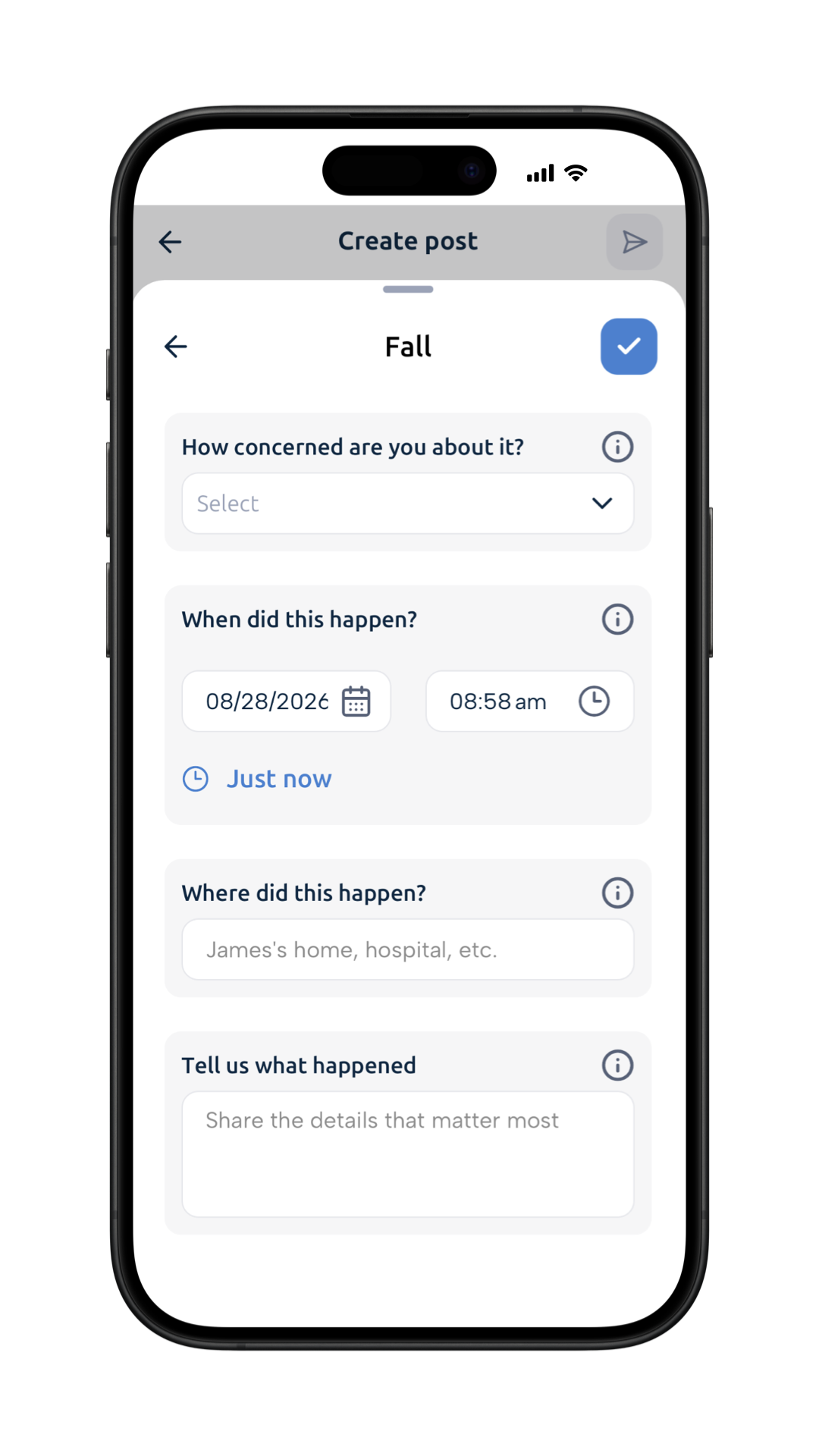
- How concerned are you about it? Flag the urgency level so your care team knows how quickly to respond.
- When did this happen? Precise timing helps your medical team understand the context.
- Where did this happen? Location matters for understanding risk patterns and safety.
- Tell us what happened. Share the details that matter most in your own words.
Step 4: Share with Your Circle
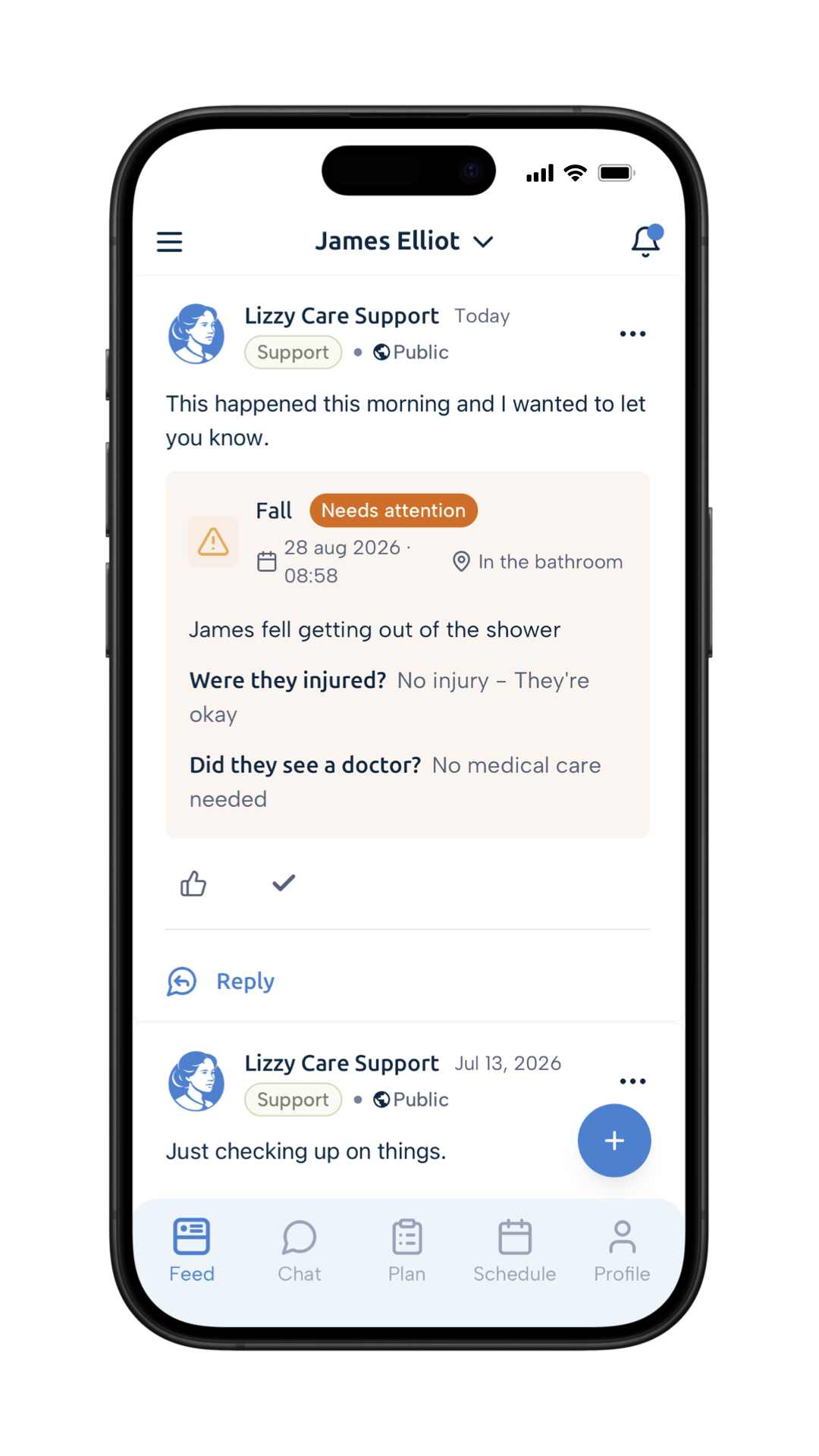
Once you post, your incident appears immediately on your Feed and will be visible to your Navigator, family members, and anyone else in your loved one’s care circle. Your Navigator reviews it and will follow up if needed.
Why This Matters
Faster Response Times
Instead of playing phone tag, your Navigator will see the incident and can prioritize care decisions based on what you’ve reported.
Structured Information
By asking the right questions (concern level, timing, location, details), we help you capture the information your care team actually needs to respond effectively.
Better Documentation
Incidents are timestamped, categorized, and stored in one place. This creates a valuable record that helps identify patterns, like whether falls are happening at certain times of day or in specific locations.
Peace of Mind for the Whole Family
Everyone in the care circle stays informed. No more family members feeling left out or worried because they didn’t hear the news. Transparency builds confidence in the care plan.
Real-World Example
Consider Maria, who uses Lizzy Care to help manage her father’s care. One morning, James, Maria’s father, has a fall while getting out of the shower. Maria is understandably shaken, but instead of making panicked phone calls, she opens Lizzy Care, selects “Fall” from the incidents menu, notes that it happened in the bathroom at 8:58 AM, and shares that he fell getting out of the shower but appears uninjured.
Within moments, the report reaches James’s Navigator, and family members. His Navigator can see his concern level, verify that he’s okay, and make note of the bathroom safety issue for future conversation. No crucial details are lost. No one is left wondering what happened.
Designed for Real Life
We built Incident Reporting with the understanding that caregivers are often managing emergencies while also managing everything else. The feature is simple enough to use in a moment of stress, but structured enough to capture the details that matter.
The incident types reflect what we hear from families most often. The form questions are designed to take 60 seconds or less to complete. The result: a clear, organized post on the Feed gives your entire care circle the information they need.
Supporting Better Outcomes
At Lizzy Care, we believe that good communication leads to better care. When families can quickly report what’s happening at home, and when Navigators have real-time visibility into these events, together you can:
- Build confidence that everyone is up-to-date
- Catch safety issues early and adjust the care plan
- Spot patterns that might indicate changing needs
- Respond faster when urgent medical attention is needed
Get Started
Incident Reporting is available now in the latest version of the Lizzy Care app. The next time something happens, whether it’s a fall, a medication change, or any other health event, you’ll have a quick, easy way to alert your care team.
Because when it comes to your loved one’s wellbeing, every moment counts. And every detail matters..
───
Your Lizzy Care team is here to help you navigate caregiving through every season. Click “Get Started” for a free consultation or visit hilizzy.com/guide/check/ to see if your family is eligible for free support through Medicare.